

Data saving and backups
On the ethoscope
Section titled “On the ethoscope”Ethoscopes save their tracking data in a database on their own SD card or SSD. Since late 2025 the default format is SQLite: each experiment is a single self-contained .db file in /ethoscope_data/results/. Compared with the MariaDB database used before:
- experiments can follow one another directly without losing data (the old format overwrote the previous experiment);
- a
.dbfile can be copied off the card by putting the card in the node or any Linux computer and opening it in a file browser; - results reach the node with rsync, like the videos.
SQLite is the default choice when you start tracking; change it only if you know you need to. By default the database also stores a camera snapshot every five minutes. The snapshots take a lot of space but help with troubleshooting, and can be turned into a time-lapse video.
For the content of the database, see The results database.
Collecting the data
Section titled “Collecting the data”The results stay on the ethoscope until they are collected, either by hand (shut the ethoscope down, take out the card and read it on a Linux computer that can read ext4), or automatically by the node’s backup service.
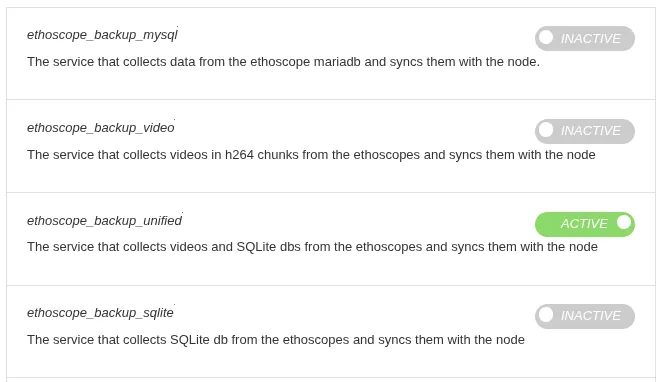
Usually ethoscope_backup_unified should be active: it copies both the tracking data and any video recordings from the ethoscopes to the node. Large video files can congest the Wi-Fi; to copy only the tracking data, switch the unified service off and ethoscope_backup_sqlite on. All of these use rsync. ethoscope_backup_mysql collects data from ethoscopes that still run the older MariaDB images.
On the node, the data are kept in two places:
/ethoscope_data/results, all the tracking data ever recorded;/ethoscope_data/videos, the video chunks of recordings.
A week of tracking from one ethoscope takes about 500 MB, so 1 TB holds about 2000 ethoscope-weeks; video takes much more.
Storing data on a separate drive
Section titled “Storing data on a separate drive”Data are best kept on a separate drive, and on a Raspberry Pi node this is a necessity. An SSD is a good choice.
After connecting the drive, find its name with sudo fdisk -l:
$ sudo fdisk -lDisk /dev/sda: 476.94 GiB, 512110190592 bytes, 1000215216 sectorsDisk model: SAMSUNG SSD PM85...Device     Boot Start        End    Sectors   Size Id Type/dev/sda1  *     2048 1000206899 1000204852 476.9G 83 Linux
Disk /dev/sdb: 3.64 TiB, 4000787029504 bytes, 7814037167 sectorsDisk model: M3 Portable...Device      Start        End    Sectors  Size Type/dev/sdb1      34     262177     262144  128M Microsoft reserved/dev/sdb2  264192 7814035455 7813771264  3.6T Microsoft basic data
In Linux, disks appear as files in /dev. Here /dev/sda is the system disk and /dev/sdb an external 4 TB USB drive with two partitions. Its large partition is formatted for Windows (NTFS); to use it as it is, install the NTFS driver:
sudo pacman -S ntfs-3gIf only Linux computers will read the drive, consider reformatting it as ext4 instead.
To mount the drive at /ethoscope_data permanently, add a line like this to /etc/fstab:
/dev/sdb2 /ethoscope_data ntfs defaults,nofail 0 2From the next boot, the drive is mounted there and all results are saved on it. You can reach the results over the network, or switch the node off and move the drive to another computer.
Copying the data elsewhere
Section titled “Copying the data elsewhere”Keep at least one copy of the data away from the node, on a network drive or a cloud service. The simplest way is to point the backup service’s destination folders at a mounted network location, with -r for the databases and -v for the videos. The service’s command line, in its systemd unit, would then read:
ExecStart=/usr/bin/python /opt/ethoscope/src/node/scripts/rsync_backup_tool.py --unified -r /mnt/nas/auto_generated_data/results -v /mnt/nas/auto_generated_data/videosAlternatively, run rsync regularly, for example from a cron job. This copies only the files changed in the last week to another server:
cd /ethoscope_data/results/rsync --files-from=<(find . -type f -mtime -7) ./ user@backup-server:/ethoscope_data/results/Deleting old data
Section titled “Deleting old data”The node accumulates a lot of data and needs pruning from time to time. This deletes every result file older than 90 days:
find /ethoscope_data/results -type f -mtime +90 -exec rm {} \;Sharing the data over FTP
Section titled “Sharing the data over FTP”An FTP server on the node makes the results available to analysis software such as rethomics and ethoscopy. vsftpd does the job. Install it:
sudo pacman -S vsftpdIn /etc/vsftpd.conf, set:
anonymous_enable=YESwrite_enable=NOseccomp_sandbox=NOTo listen on IPv6 as well as IPv4, also set:
listen=NOlisten_ipv6=YESOn Ubuntu, also check that /etc/pam.d/vsftpd reads:
# Standard behaviour for ftpd(8).#auth required pam_listfile.so item=user sense=deny file=/etc/ftpusers onerr=succeedauth required pam_nologin.soCreate a mount point under /srv/ftp and bind the results folder to it in /etc/fstab:
sudo mkdir -p /srv/ftp/auto_generated_data/ethoscope_resultsecho "/ethoscope_data/results /srv/ftp/auto_generated_data/ethoscope_results none bind 0 0" | sudo tee -a /etc/fstabThen start the service:
sudo systemctl enable --now vsftpdThe data are now available over FTP, and rethomics can read them with:
REMOTE_DATA_SOURCE <- "ftp://your_node.address/auto_generated_data/ethoscope_results"The node’s Docker setup includes an FTP service.
An index of the data
Section titled “An index of the data”rethomics finds the result files through an index file at the root of the results folder. This one-line script writes it:
#!/bin/bashcd /ethoscope_data/resultsfind . -type f -name '*.db' -printf '"%P",%s\n' > index.txtRun it regularly, for example by saving it in /etc/cron.daily (and making it executable) so that it runs once a day.