Training an HMM
Behavpy has methods to train and decode Hidden Markov Models (HMM) that segment and predict sleep and awake stages in Drosophila. A good introduction to HMMs is available here: https://web.stanford.edu/~jurafsky/slp3/A.pdf.
To provide a basic overview, HMMs are a generative probabilistic model, in which there is an assumption that a sequence of observable variables is generated by a sequence of internal hidden states. The transition probabilities between hidden states are assumed to follow the principles of a first order Markov chain.
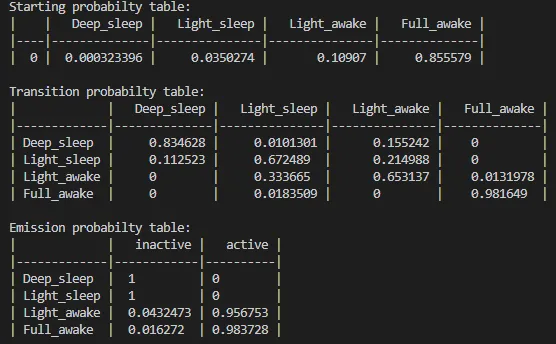
Within this tutorial we will apply this framework to the analysis of sleep in Drosophila, using the observable variable movement to predict the hidden states: deep sleep, light sleep, quiet awake, active awake.
Hmmlearn
Section titled “Hmmlearn”Behavpy utilises the brilliant Python package Hmmlearn under the hood. Currently behavpy only uses the categorical version of the models available, as such it can only be trained on and decode sequences that are categorical and in an integer form. If you wish to use their other models (multinomial, gaussian and guassian mixture models) or want to read more on their capabilities, head to their docs page for more information: https://hmmlearn.readthedocs.io/en/latest/index.html
Initialising behavpy
Section titled “Initialising behavpy”The HMM methods are part of every behavpy object, alongside all the previous methods and the usual Pandas capabilities (ethoscopy before version 2.0 had a separate behavpy_HMM class).
import ethoscopy as ethofrom functools import partial
# You can load your data using the previously mentioned functionsmeta = etho.link_meta_index(meta_loc, local)data = etho.load_ethoscope(meta, min_time = 24, max_time = 48, reference_hour = 9.0, FUN = partial(etho.max_velocity_detector, time_window_length = 60))
# Remember you can save the data and metadata as pickle files, see the loading section for a reminder about it
# to initialise a behavpy object, just call it with the data and meta as arguments. Have check = True to ensure the ids match.df = etho.behavpy(data, meta, check = True, canvas = 'plotly')
Data curation
Section titled “Data curation”The data passed to the model needs to be good quality with long sequences containing minimal gaps and all a decent length in total.
Use the .curate() and .bin_time() methods mentioned previously to curate the data. It is recommended to bin the data points to 60 second bins when analysing sleep and movement. But feel free to experiment with what works with your data.
import ethoscopy as etho# load your data and metadata in and initialise your behavpy objectdf = etho.behavpy(data, meta, check = True, canvas = 'plotly')
# it's often a good idea to filter out the start and beginning of experimentsdf = df.t_filter(start_time = 24, end_time = 96)
# remove specimens with less than a days worth of data (if binned to 60 seconds)df = df.curate(points = 1440)
# Any NaN values will throw an error when trying to train the HMM. It's good practice to check the data for any# If below returns True you have NaN values in your dataprint(df['YOUR COLUMN'].isnull().any())# If it is True then look at those values and replace or remove (the whole specimen) from the dataset# Use below to view which rows have NaNs, see pandas documentation for more information on how to replace NaN valuesdf[df['YOUR COLUMN'].isnull()]
# binning the variable can be done within the .hmm_train() method, see next!
Training a HMM
Section titled “Training a HMM”Behavpy provides a wrapper method, .hmm_train(), for the hmmlearn categorical model. The method extends the hmmlearn model by automatically manipulating the data into a readable format for training. Additionally, the method provides the option to randomise the initialised transition / emission parameters to train the model several times. Each iterative model is compared to the best previous performing model with the hopes of avoiding reaching a local minimum during hmmlearn’s own internal iterative process.
As mentioned previously the HMM used here is categorical, therefore only select data that is categorically discrete. For example here we will be using activity, with not moving being one state and moving the other. These states as data must be in integer form. So this example, not moving will = 0 and moving will = 1. Follow this example if using more states, so if you have three states use the integers 0, 1, 2.
In setting up the HMM you have to specify how many hidden states your system will have and the what states can transition into one another. See below for an example.
Setting up
import numpy as np
# the setup for .hmm_train()
# name your hidden states and observables. This is just purely for visualising the output and setting the number of hidden states!hidden_states = ['Deep sleep', 'Light sleep', 'Light awake', 'Active awake']observable_variables = ['inactive', 'active']
# if you believe your hidden states can only transition into specific states or there's a flow you can setup the model to train with this in mind. Have the transitions you want to happen set as 'rand' and those that can't as 0t_prob = np.array([['rand', 'rand', 'rand', 0.00],                   ['rand', 'rand', 'rand', 0.00],                   [0.00, 'rand', 'rand', 'rand'],                   [0.00, 'rand', 'rand', 'rand']])
# Make sure your emission matrix aligns with your categoriesem_prob =  np.array([[1, 0],                     [1,0],                     ['rand', 'rand'],                     ['rand', 'rand']])
# the shape of each array should be len(hidden_states) X len(hidden_states) and len(hidden_states) X len(observable_variables). E.g. 4x4 and 4x2 respectivelyTraining
# add the above variables to the hmm_train method# iterations is the number of loops with a new randomised parameters# hmm_iterations is the number of loops within hmmlearn before it stops. This is superseded by tol, which is the difference in the loglikelihood score per iteration within hmmlearn# save the best performing model as a .pkl filedf.hmm_train( states = hidden_states, observables = observable_variables, var_column = 'moving', trans_probs = t_prob, emiss_probs = em_prob, start_probs = None, iterations = 10, hmm_iterations = 100, tol = 2, t_column = 't', bin_time = 60, file_name = 'experiment_hmm.pkl', # replace with your own file name verbose = False)# If verbose is true the loglikelihood per hmm iteration is printed to screen# hmm_train also returns the best model, so you can assign it: h = df.hmm_train(...)