

Offline tracking
An ethoscope can track a recorded video instead of the live camera stream, for example to re-analyse an experiment. The results are saved as for any other experiment.
On an ethoscope
Section titled “On an ethoscope”This is the easiest way, but also the slowest: it runs only as fast as the ethoscope can track.
-
Mark the ethoscope as experimental in its settings (see first boot and settings).
-
Record the video as usual.
-
When the recording is finished, convert it: on experimental ethoscopes the Video menu has a Convert Videos entry.
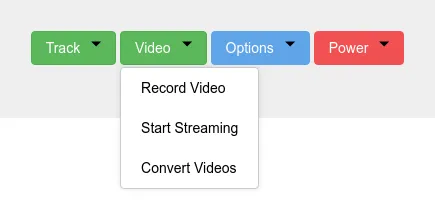
The conversion can take a few minutes and shows no progress. It needs extra space on the SD card.
-
Start tracking as usual, choosing
MovieVirtualCameraas the camera. A list of the videos found on the ethoscope opens; pick the one to track. If it is not listed, the conversion has probably not finished.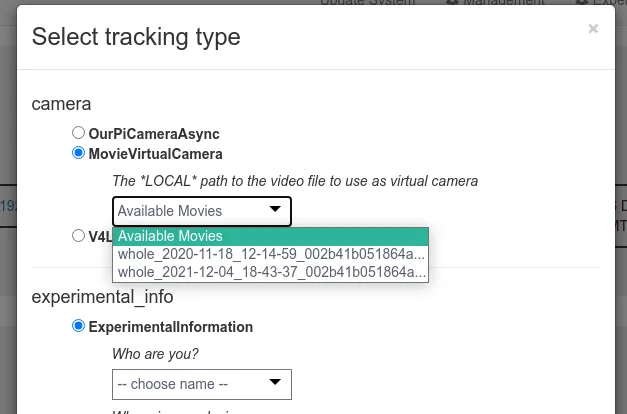
The ethoscope now tracks the video instead of the camera and saves the data as usual.
On a virtual ethoscope
Section titled “On a virtual ethoscope”A virtual ethoscope, or virtuascope, is ethoscope software running on a computer that is not a Raspberry Pi, such as the node. It appears in the node’s list next to the real ethoscopes and is convenient for tracking videos offline.
- With Docker (recommended): the
Docker/virtuascopefolder of the repository runs a virtuascope withdocker compose up -d, on the node or any powerful Linux computer. Its README lists the requirements, such as the node’s Docker network and, for a virtual camera, thev4l2loopbackkernel module. - From the AUR, on an Arch-based node:
yay -S ethoscope-virtuascope.
The node can switch the virtuascope service on and off.

To track with a virtuascope, record the video on a real ethoscope and let it be copied to the node, then follow the steps above from step 3.
The ethoscope Python package can also be used directly, by programmers, to track video files without a device; its modules are in src/ethoscope of the repository.