

Running an experiment
Experiments are started, watched and stopped from the node’s web interface. This page brings together what to check before starting and the choices you make when you start.
Before you start
Section titled “Before you start”- The ethoscope has its ID and settings (see first boot and settings) and is in focus (Camera and focus).
- The arena has its three targets: without them the ethoscope can record video but cannot track.
- The incubator is registered on the node, with its light schedule if you use the GPIO shield’s LED, and any sensor in it has the incubator’s name as its location.
- A module, if you use one, is connected to the ethoscope by USB and has the right firmware.
- The node’s backup service is active, so that results are copied as the experiment runs (see Data saving and backups).
Starting
Section titled “Starting”Open the ethoscope’s page on the node. The Track menu starts tracking; the Video menu records video, starts a live stream, or (on experimental machines) converts recorded video; Options shows the logs, opens the settings, frees space on the card and tests a connected module (Module Info); Power shuts down, reboots or restarts the machine, and is available only while it is stopped.
When you start tracking, a form asks for:
- Who you are and where the ethoscope is: the user and the incubator, which are stored with the results. The incubator links the experiment to the readings of the sensors in it and, with the GPIO shield, to its light schedule.
- How results are saved: see below.
- The stimulator (interactor), if a module should act on the flies: see below.
- The camera: the Raspberry Pi camera for normal experiments, or a recorded video for offline tracking.
Saving results
Section titled “Saving results”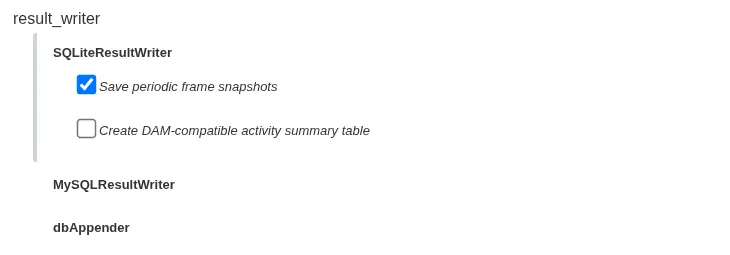
Keep the default, SQLiteResultWriter, unless you know you need another. It writes the results to an SQLite file on the ethoscope and, by default, stores a camera snapshot every five minutes, useful for checking an experiment afterwards and for making a time-lapse video. See Data saving and backups.
Choosing a stimulator
Section titled “Choosing a stimulator”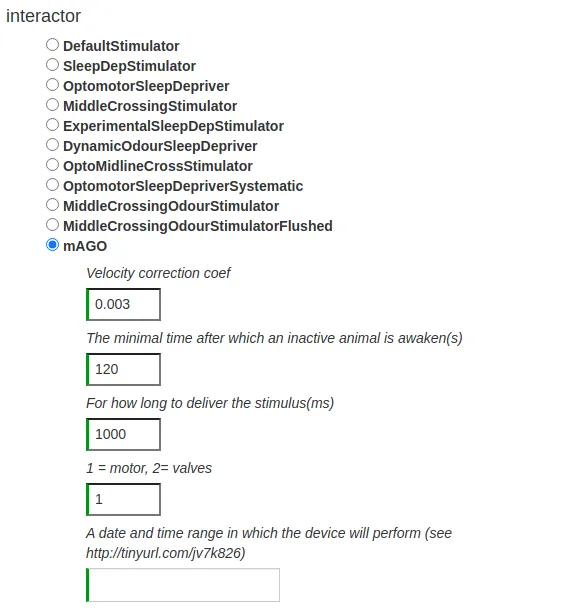
Without a module, keep the default, which does not act on the flies. To drive a module, choose the stimulator that matches its type (see the modules overview) and set its parameters, typically the inactivity threshold (velocity_correction_coef, min_inactive_time), the length of a stimulus and, where it applies, the stimulus type.
The date range limits when the stimulator acts. It is one or more ranges separated by commas, each written start > end with dates as YYYY-MM-DD HH:MM:SS; either end can be left empty for an open range, and ranges may not overlap. For example, 2026-11-02 09:00:00 > 2026-11-03 09:00:00 stimulates for 24 hours from 9 am on 2 November. Leave it empty to stimulate for the whole experiment.
During the experiment
Section titled “During the experiment”The node shows each ethoscope’s state. Tracking runs on the ethoscope itself: if the node or the network goes down, it continues, and the node collects the data once it is back. To watch the camera, use Video → Start Streaming.
Stopping
Section titled “Stopping”While an experiment runs, the ethoscope’s page shows a Stop button. To move or switch off an ethoscope, stop it, then shut it down from the Power menu.