

Visualising mAGO data
Within the Gilestro lab we have special adaptations to the ethoscope which includes the mAGO, a module that can sleep deprive flies mechanically and also deliver a puff of an odour of choice after periods of rest. How to build and set up the module is described in Odour delivery (AGO and mAGO) in the Ethoscope manual.
If you’ve performed a mAGO experiment then the data needs to be loaded with the stimulus_response analysing function, which decides that a fly has responded if it moved within a time window after the puff (default 10 seconds). Load the same experiment a second time with sleep_annotation or max_velocity_detector to get its movement data.
from functools import partial
# one row per puff, with the columns 'has_interacted' and 'has_responded'puff_data = etho.load_ethoscope(meta, reference_hour = 9.0, FUN = partial(etho.stimulus_response, response_window_length = 10))puff_df = etho.behavpy(puff_data, meta, check = True, canvas = 'plotly')
# the movement data of the same fliesmov_data = etho.load_ethoscope(meta, reference_hour = 9.0, FUN = partial(etho.sleep_annotation, rule = 'k'))df = etho.behavpy(mov_data, meta, check = True, canvas = 'plotly')
Quantify response
Section titled “Quantify response”The method .plot_response_quantify() will produce a plot of the mean response rate per group. Within the software for delivering a puff it can be set to have a random chance of occurring. I.e. if it’s set to 50%, and the immobility criteria is met then the chance a puff will be delivered is 50/50. This gives us two sets of data, true response rate and the underlying likelihood a fly will just randomly move, which is called here Spontaneous Movement (Spon. Mov).
# The parameters other than response_col (which is the column of the response per puff) are the same as other quantify methods
fig, stats = puff_df.plot_response_quantify(response_col = 'has_responded',facet_col = 'species',)fig.show()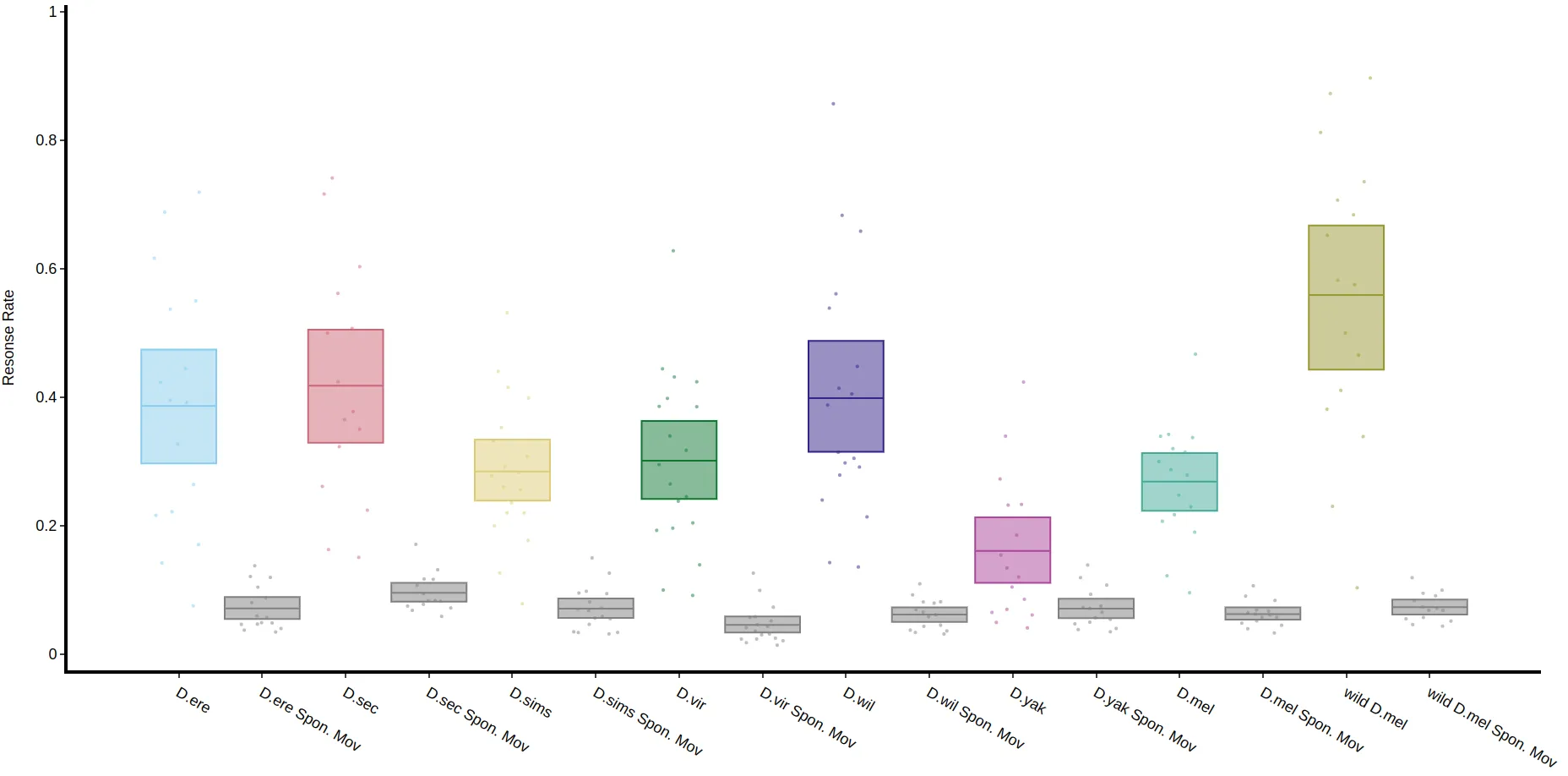
Response and the preceding activity
Section titled “Response and the preceding activity”You can also view how the response rate changes with the time the fly had spent inactive (or active) before the puff with .plot_response_over_activity(). Call it on the puff behavpy table and pass the movement behavpy table as mov_df, as the method needs the movement data around each puff. The movement data is binned to t_bin seconds (60 by default), so the x-axis gives the length of the bout before the puff in minutes, up to x_limit (30 by default).
# The activity argument decides if you're looking at runs of inactivity or activity ('inactive', 'active' or 'both')# if you set the puff chance low enough you can probe activity too
fig = puff_df.plot_response_over_activity(mov_df = df,activity = 'inactive',facet_col = 'species')fig.show()
Response over time
Section titled “Response over time”.plot_response_overtime() plots the response rate over the course of the experiment, binned to t_bin_hours, or over one day with wrapped = True. Spontaneous movement after mock puffs is plotted separately.
fig = puff_df.plot_response_overtime(t_bin_hours = 1,wrapped = True,facet_col = 'species')fig.show()