Periodograms
Periodograms are essential for definitely showing periodicity in a quantifiable way. Periodograms often make use of algorithms created for spectral analysis, to decompose a signal into its component waves of varying frequencies. This has been adopted to behavioural data, in that it can find a base rhythm over several days from what is usually unclean data.
Behavpy has 5 types of periodograms built in, which are ‘chi squared’ (the most commonly used), ‘lomb scargle’, ‘fourier’, and ‘welch’ (all based on the Fast Fourier Transformation (FFT) algorithm) and ‘wavelet’ (using FFT but maintaining the time dimension).
Try them all out on your data and see which works best for you.
Setting up
Section titled “Setting up”The periodogram methods are part of every behavpy object, so no special class is needed (ethoscopy before version 2.0 had a separate behavpy_periodogram class). Your data needs a column of movement, such as moving.
per_df = etho.behavpy(data, metadata, check = True, canvas = 'plotly')Calculating Periodograms
Section titled “Calculating Periodograms”# The below method calculates the output from a periodogram function, returning a new dataframe with information about each period in your given range# and the power for each period# .periodogram() computes 4 types of periodograms, choose from this list ['chi_squared', 'lomb_scargle', 'fourier', 'welch']
per_chi = per_df.periodogram( mov_variable = 'moving', periodogram = 'chi_squared', # change the argument here to the other periodogram types period_range = [10,32], # the range in time (hours) we think the circadian frequency lies, [10,32] is the default sampling_rate = 15, # the time in minutes you wish to smooth the data to. This method will interpolate missing results alpha = 0.01 # the cutoff value for significance, i.e. 1% confidence)
# Hint! Sometimes increasing the sampling_rate can improve your periodograms. On average we found 15 to work best with our data, but it can be different for everyonePlotting Periodograms
Section titled “Plotting Periodograms”Tile Plots
Section titled “Tile Plots”To get a good understanding of each individual specimen you can use the tiled periodogram plot
# Like the actogram_tile method we can rely on the ids of each specimen or we can use labels we createdfig = per_chi.plot_periodogram_tile( labels = 'tile_labels', find_peaks = True, # make find_peaks True to add a marker over significant peaks title = 'Tiled Chi Squared Periodogram')fig.show()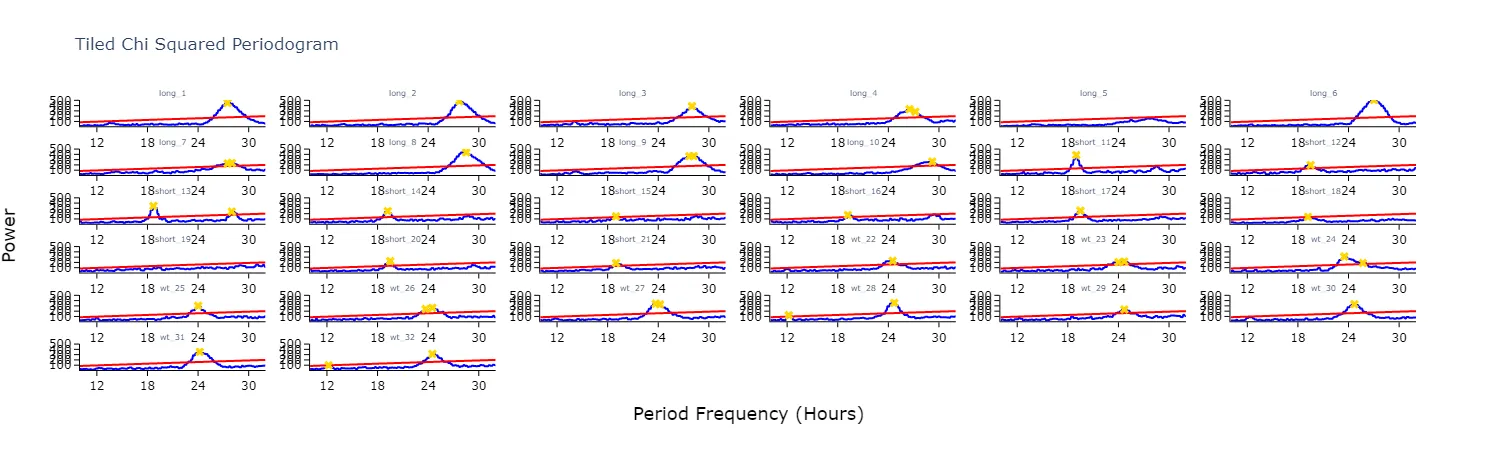
Grouped plots
Section titled “Grouped plots”Plot the average of each specimens periodograms to get a better view of the difference between experimental groups.
fig = per_chi.plot_periodogram( facet_col = 'period_group', facet_arg = ['short', 'wt', 'long'], title = 'Grouped Chi Squared Periodogram')fig.show()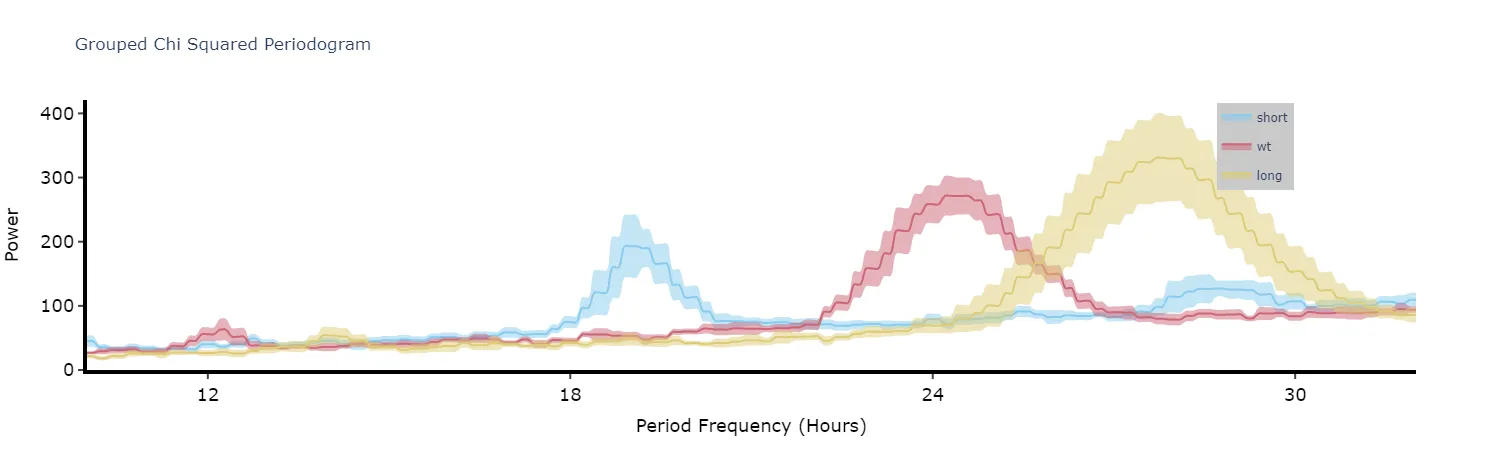
Quantifying plots
Section titled “Quantifying plots”Like with the ethograms we can plot the above as quantification plot to see if what we see by eye is true statistically.
# Quantify the periodograms by finding the highest power peak and comparing it across specimens in a group# call .plot_periodogram_quantify() to get the resultsfig, stats = per_chi.plot_periodogram_quantify( facet_col = 'period_group', facet_arg = ['short', 'wt', 'long'], title = 'Quantification of Chi Squared Periodogram')fig.show()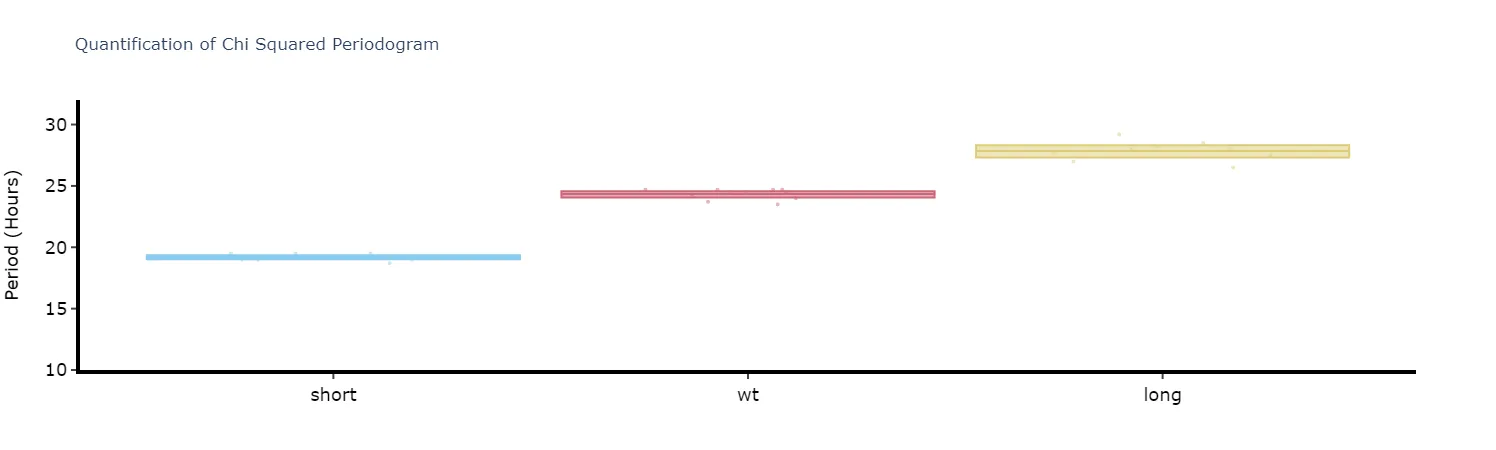
Wavelets
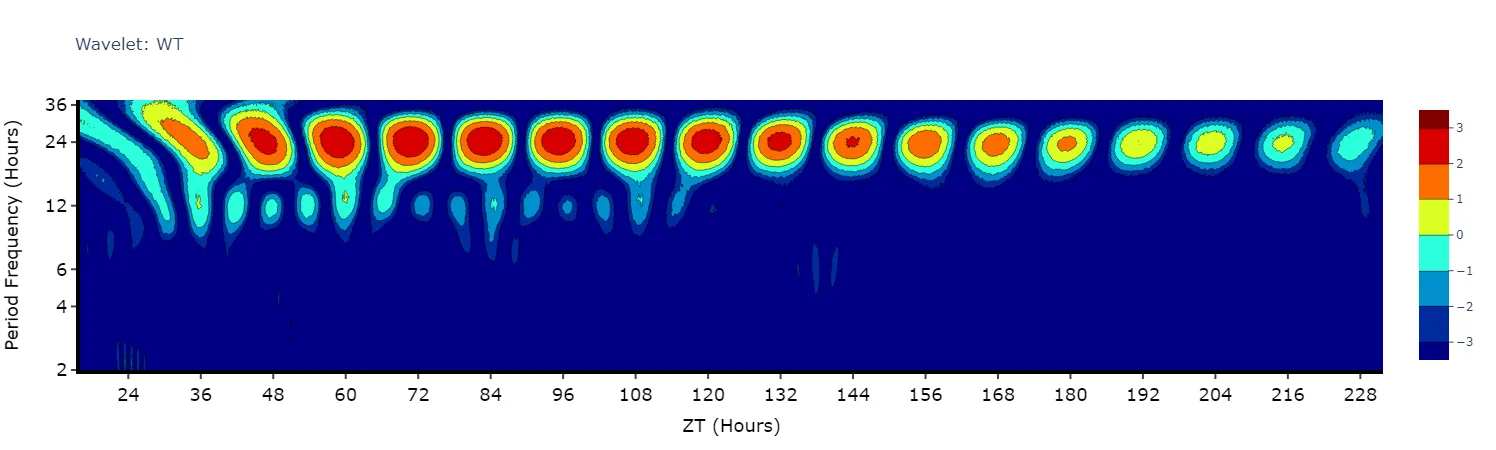
Section titled “Wavelets”Wavelets are a special branch of periodograms as they are calculated in 3 dimensions rather than 2. Finding the period and power not for the whole given time, but rather broken down from the start to end. This then gives you an understanding of how rhythmicity changes over the course of your experiment, such as when you shift from LD to DD.
Wavelet plots are quite visually intensive, therefore the .plot_wavelet() method will only compute and plot the average of all the data present in the data frame. Therefore, you will need to do some filtering beforehand to look at individual groups or an individual specimen. It works on the movement data directly, so call it on the behavpy object rather than on the output of .periodogram().
# This method is powered by the python package pywt, Head to https://pywavelets.readthedocs.io/en/latest/ for information about the package and the other wavelet types
# filter your df prior to calling the plotwt_df = per_df.xmv('period_group', 'wt')
fig = wt_df.plot_wavelet(        mov_variable = 'moving',        sampling_rate = 15, # increasing the sampling rate will increase the resolution of lower frequencies (16-30 hours), but lose resolution of higher frequencies (2-8 hours)        scale = 156, # the default is 156, increasing this number will increase the resolution of lower frequencies (and lower the high frequencies), but it will take longer to compute        wavelet_type = 'morl', # the default wavelet type and the most commonly used in circadian analysis. Head to the website above for the other wavelet types or call the method .wavelet_types() to see their names        title = 'Wavelet: WT')fig.show()