

Tutorial 6 — Exporting to hctsa (MATLAB)
This tutorial will take you though converting a behavpy dataset into a format that can be input into HCTSA, a time series comparative analysis software. Currently the full suite of software only works in Matlab. So this tutorial shows you have to convert the data into .mat file that you can then use in the HCTSA environment. The .mat file will include the time series data per specimen, the labels (id), and keywords per specimen.
Section titled “This tutorial will take you though converting a behavpy dataset into a format that can be input into HCTSA, a time series comparative analysis software. Currently the full suite of software only works in Matlab. So this tutorial shows you have to convert the data into .mat file that you can then use in the HCTSA environment. The .mat file will include the time series data per specimen, the labels (id), and keywords per specimen.”If you want to just stick with python see tutorial 5 which uses HCTSA smaller toolbox catch22, that uses the top 22 most common analytical methods from HCTSA in a python environment.
Section titled “If you want to just stick with python see tutorial 5 which uses HCTSA smaller toolbox catch22, that uses the top 22 most common analytical methods from HCTSA in a python environment.”1. Load the dummy dataset
Section titled “1. Load the dummy dataset”import ethoscopy as ethoimport pandas as pdimport numpy as npfrom functools import partial# we need the scipy function savemat to create a .mat filefrom scipy.io import savematOne-time setup: fetch the tutorial datasets
Section titled “One-time setup: fetch the tutorial datasets”The tutorial pickle files (~36 MB total, dominated by overview_data.pkl) are not bundled with the PyPI package, to keep pip install ethoscopy lean.
Run the cell below once per environment to download them into the installed package directory. Subsequent runs are idempotent (already-present files are skipped).
You can also fetch them manually from https://github.com/gilestrolab/ethoscopy/tree/main/src/ethoscopy/misc/tutorial_data.
# Idempotent: skips files that are already present.import ethoscopy as ethoetho.download_tutorial_data() [skip] overview_data.pkl (already present) [skip] overview_meta.pkl (already present) [skip] circadian_data.pkl (already present) [skip] circadian_meta.pkl (already present) [skip] 4_states_F_WT.pkl (already present) [skip] 4_states_M_WT.pkl (already present)Tutorial data ready in: ~/.cache/ethoscopy/tutorial_data
PosixPath('~/.cache/ethoscopy/tutorial_data')# Load in the data from the overview tutorialfrom ethoscopy.misc.get_tutorials import get_tutorialdata, metadata = get_tutorial('overview')df = etho.behavpy(data, metadata, check = True)2. Choose the variable you want to analyse in HCTSA
Section titled “2. Choose the variable you want to analyse in HCTSA”# Lets use x (the position of the fly) for this tutorialvar = 'x'HCTSA needs time series data of the same length so we need to do some data curation
Section titled “HCTSA needs time series data of the same length so we need to do some data curation”# The ethoscope if loading with sleep_annoation will interpolate data about sleep, this causes NaN values for the normal variables other than 'asleep'# So we need to filter it outdf = df[df['is_interpolated'] == False]# check to see if any NaN values are leftdf[df[var].isnull()]| t | x | y | w | h | phi | max_velocity | mean_velocity | distance | interactions | beam_crosses | moving | micro | walk | is_interpolated | asleep | |
|---|---|---|---|---|---|---|---|---|---|---|---|---|---|---|---|---|
| id |
# The most basic curation is to pick a specific time perioddf = df.t_filter(start_time = 24, end_time = 48)# We can also use interpolate to fill in the missing data points, this can be useful if it's only a few points missing per specimendf_i = df.interpolate_linear(variable = 'x', step_size = 60, t_column = 't')# We can also group several rows together by increasing the t diff, here we increase# from 60 to 120, so we find the average of every two rows if theredf_bt = df.bin_time(variable = var, bin_secs = 120, function = 'mean')# Once we've completed our curation or if we just want to remove specimens that don't have enough values,# we can call curate to remove all specimens with too few points stilldf_c = df.curate(points = ((24*60*60) / 60)-1) # 24*60*60 = seconds in a day and then divided by are t diff per row.
# Note: If you've called the above bin_time this curate will return an empty dataframe# lets just use the interpolate methoddf = df.interpolate_linear(variable = 'x', step_size = 60, t_column = 't')# When using x position data the interesting part is how the fly positions itself in relation to the food# However this will be different on the x,y axis for flies on either side of the ethoscope, so lets normalise it# You only need to run this is using the x variabledf_r = df.xmv('region_id', list(range(11,21)))df_l = df.xmv('region_id', list(range(1,11)))df_r['x'] = 1 - df_r['x']df = etho.concat(df_l, df_r)3. Normalise the data
Section titled “3. Normalise the data”The ethoscope data can do with a bit of augmentation to make it perform better in HCTSA
Section titled “The ethoscope data can do with a bit of augmentation to make it perform better in HCTSA”# First lets put our data into numpy arrayslist_x = df.groupby(df.index, sort = False)[var].apply(list)arr_x = np.array([np.array(x) for x in list_x])# Here we grab the ids of each for the labels that we'll use laterlist_id = list_x.index.tolist()# Use some or all of these functions to normalise the data between specimens
# norm transforms the data to be between 0 and 1def norm_01(x): return (x-np.nanmin(x))/(np.nanmax(x)-np.nanmin(x))# or# find the zscoredef zscore(x): return (x-np.mean(x))/(np.std(x))
# Only use this if looking at phi, it changes it be only from 0-90 or horizontal to veritcal as the ethoscope doesn't track directiondef norm_phi(x): return np.where(x > 90, 90 - (x - 90), x)
# Smooth out the time series datadef moving_average(a, n) : ret = np.cumsum(a, dtype=float) ret[n:] = ret[n:] - ret[:-n] return ret[n - 1:] / n# We can have a look at this effect through some plotsimport matplotlib.pyplot as pltind1 = np.random.randint(len(arr_x))ind2 = np.random.randint(len(arr_x))
plt.figure(figsize=(9, 6))plt.plot(arr_x[ind1], color = 'red')plt.plot(arr_x[ind2], color = 'blue')plt.xlabel('Time (s)', fontsize=12)plt.ylabel(f'{var} value', fontsize=12)plt.show()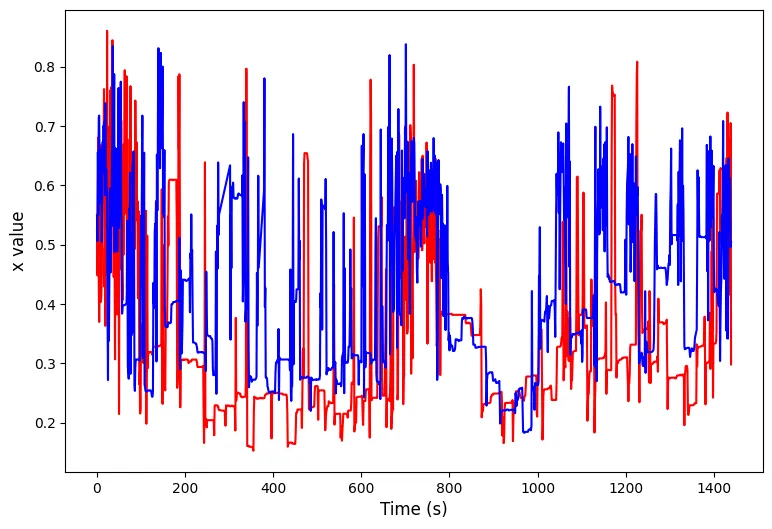
# Apply the function along the axisarr_x = np.apply_along_axis(norm_01, 1, arr_x)arr_x = np.apply_along_axis(partial(moving_average, n = 5), 1, arr_x)plt.figure(figsize=(9, 6))plt.plot(arr_x[ind1], color = 'red')plt.plot(arr_x[ind2], color = 'blue')plt.xlabel('Time (s)', fontsize=12)plt.ylabel(f'{var} value', fontsize=12)plt.show()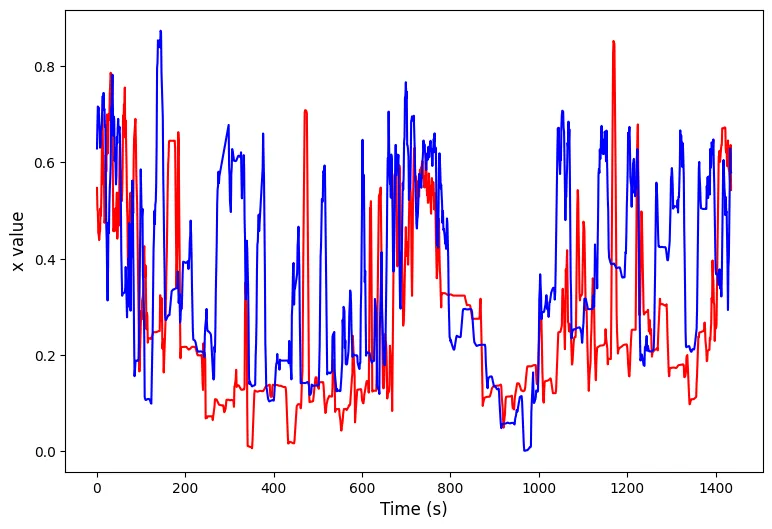
4. Create the Time Series, Keywords, and labels for the .mat file
Section titled “4. Create the Time Series, Keywords, and labels for the .mat file”# Here the time series data is augmented to fit into the correct format# it's stored as the variable ts_matts_mat = np.zeros((len(arr_x),), dtype = object)for i in range(len(arr_x)): ts_mat[i] = arr_x[i]# HCTSA allows keywords to describe each series, we can grab these from the meta data# Feel free to make your own lists of keywords if you haven't got them in your metadata, just make sure they have the right postions in relation to the ids# Filter by the list_id to make sure we only grab those we retained from the data curation and it's the correct orderlist_sex = df.meta['sex'].filter(list_id).tolist()list_sle = df.meta['sleep_deprived'].filter(list_id).tolist()# Add the keywords together into a single string to match the HCTSA formatlist_key = np.array([f'{i},{q}' for i, q in zip(list_sex, list_sle)], dtype=object)# Make the id/label list into an object tyoe numpy array so it formats properlylist_lab = np.array(list_id, dtype=object)# Save to a .mat filesavemat('./ts.mat', {'timeSeriesData' : ts_mat, 'labels' : list_lab, 'keywords' : list_key})